If you’ve been scrolling through social media lately, you’ve probably seen eye-catching toy-like images that look like tiny collectible figurines of real people, pets, or even celebrities. This viral phenomenon is called the Nano Banana trend, and it has taken the internet by storm. Everyone from casual creators to professional designers is experimenting with it, and the results are everywhere on Instagram, X, and Reddit. The best part? You can easily make your own version without needing advanced design skills. In this blog, I’ll show you exactly how to create your own Nano Banana image, which tools you’ll need, and the exact prompt that’s making these images go viral.
What Exactly Is Nano Banana?
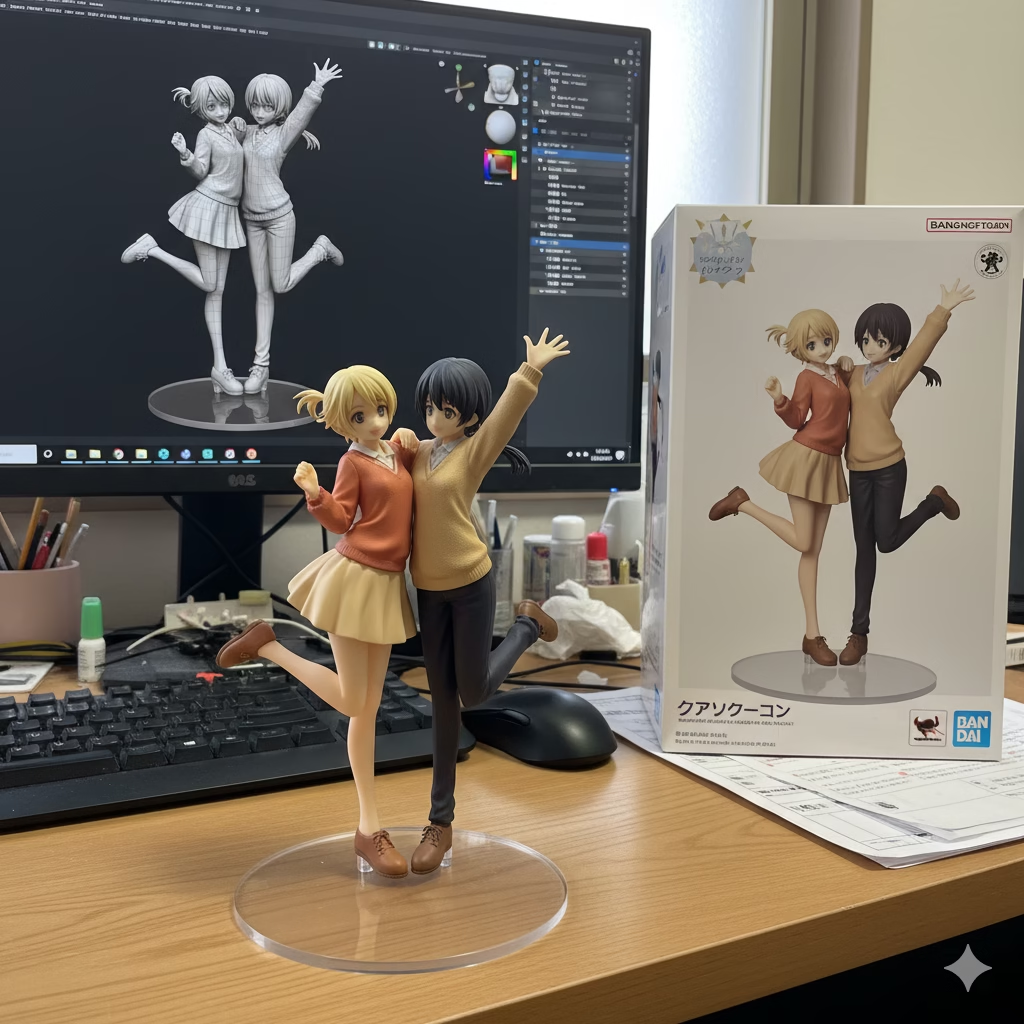
The term “Nano Banana” refers to a trend powered by Google Gemini’s latest image generation model (Gemini 2.5 Flash Image). This model is capable of transforming simple photos into hyper-realistic 3D figurine-style images that look like collectible toys. These figurines are usually shown standing on transparent bases, with carefully designed packaging boxes next to them, making the final result look like a professionally manufactured toy straight from a store shelf.
The appeal lies in how realistic yet playful these creations look. They feel like a mix between real-world merchandise and digital art, making them perfect for sharing online. Whether it’s a figurine of yourself, your pet, or even a fictional character, the Nano Banana style adds a fun and polished collectible effect.
Why Is This Trend Exploding?
Trends go viral when they’re easy, creative, and shareable — and Nano Banana checks all three boxes. Anyone can create these images for free with Gemini, the outputs look incredibly polished, and people love showing off the toy-like versions of themselves online. It has that same collectible charm as Funko Pop toys but with a more realistic 3D finish. The result feels personal and professional at the same time, which is why it’s dominating feeds right now.
What Tools Do You Need?
To join the Nano Banana trend, you’ll need Google Gemini — either through the Gemini app on your phone or by using Google AI Studio on your desktop. You don’t need expensive software or editing tools; everything happens inside Gemini’s image model. Ideally, you’ll also have:
- A clear, high-quality photo of yourself, your pet, or the subject you want to transform.
- A stable internet connection.
- A device (phone or laptop) that can run Gemini without interruptions.
That’s it — you’re ready to go.
The Prompt That Makes It Work
The secret sauce of the Nano Banana trend lies in the prompt. While you can experiment with your own versions, here’s the original prompt that creators are using to generate the viral figurine style:
“Using the nano-banana model, create a 1/7 scale commercialized figurine of the characters in the picture, in a realistic style, in a real environment. The figurine is placed on a computer desk. The figurine has a round transparent acrylic base, with no text on the base. The content on the computer screen is the brush modeling process of this figurine. Next to the computer screen is a BANDAI-style toy packaging box printed with the original artwork. The packaging features two-dimensional flat illustrations. Please turn this photo into a figure. Behind it, there should be a Model packaging box with the character from this photo printed on it. In front of the box.on a round plastic baseplace the figure version of the photo I gave you. I’d like the PVC material to be clearly represented. It would be even better if the background is indoors. Image ratio should be 9:16 also maintain HD quality of image.“
By pasting this into Gemini along with your image, you’ll get that polished collectible-toy look.
Step-by-Step: How to Create Your Nano Banana Image
Here’s how to bring your own figurine to life:
- Open the Gemini app or visit Google AI Studio.
- Upload a clear photo of the subject you want turned into a figurine.
- Copy and paste the prompt above into the text field.
- Press Generate and wait for Gemini to create the image.
- Review the output. If you’d like adjustments — for example, brighter lighting, a different pose, or a new background — simply add those details to the prompt and re-generate.
- Save your final figurine image and share it with friends or on social media.
Tips for Better Results
To make your Nano Banana image even more impressive, start with a photo that has good lighting and minimal background clutter. Be specific in your prompt if you want certain details, like “soft cinematic lighting” or “a glossy black packaging box.” Small prompt tweaks can make your figurine look even more professional.
Wrapping Up
The Nano Banana trend is one of the most exciting AI art waves we’ve seen in 2025, and now you know how to create your own. With nothing more than Google Gemini, a clear photo, and the right prompt, you can join thousands of creators who are turning themselves into collectible figurines. So go ahead — try it out, share your Nano Banana creation online, and see the reactions roll in.